A review of 8 of the most important and best features of Apple’s iOS 13 update for iPhones
 By Admin
Apple unveiled iOS 13 recently this year at the WWDC 2019 event. The new version comes with massive improvements and new features that you will really enjoy on your iPhone. Although it is still in the experimental stage, there are prominent and important features that must be highlighted, and this is exactly what we will do.
Here is a review of the best features of Apple's iOS 13 update for iPhones, so follow the next lines with us. As usual every new year, Apple announced the next version of iOS during the WWDC 2019 conference on June 3. As is known, iOS 13 will include everything #iPhone owners need in terms of features and features to enhance their experience.
Note that I did not mention iPad tablets because the company decided to allocate the iOS system only to the iPhone and adopt the new iPadOS system, which will be focused on during the coming period to take the iPad to another level. In any case, in this article, we have collected all the important features that iPhone users will enjoy once the new version reaches everyone in general in September this year, as it is still undergoing beta testing. If you can't wait, you can get the "beta" versions of iOS via the following link: developer.apple.com/download, but we do not recommend doing this on the main phone that you use daily due to the possibility of encountering errors and problems.
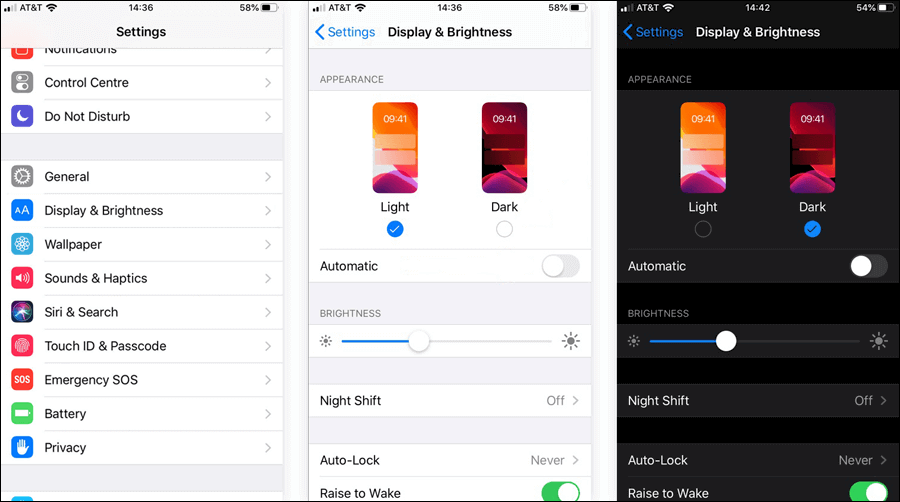
So, let's start directly by reviewing the features of the iOS 13 update that you should know. Features of the iOS 13 update that you should know The first feature: Dark mode After years of waiting, Apple has finally provided dark mode in the iOS system so that users can enjoy a better phone experience. It is the most important feature in the new IOS update and what makes it really important is the fact that the dark mode is widely implemented in the system, so that the installed applications that support this mode will automatically activate the dark theme within it, also the settings screen and almost all Apple applications that come pre-installed on the system will turn their colors to black or dark gray, including the keyboard and the lock screen, Apple even decided to include dynamic wallpapers to go with the dark theme.
To activate this new mode, go to Settings, then to the Display & Brightness section, then under the Appearance section, select Dark so that dark colors cover the entire system, which will give you a better experience if you are using any of the modern iPhones that come with an OLED screen, with the exception of the iPhone XR. Note that there is also an Automatic option that you can activate to schedule this mode to activate automatically at a specific time. Second feature: New tools for editing photos and videos. The Photos application received huge attention from Apple, and this was evident in iOS 13.
Now the app is classified! Meaning that there are tabs at the bottom that give you a better way to browse the images. For example, if you go to the “Days” tab, you will see the best photos taken on the specific day while hiding screenshots and other types of photos.
The same applies to the “Month” tab, but the “Years” tab is a bit interesting because it displays photos taken according to the specific days of the year. So, you can just scroll through and see the special moments you had during the year, and you can also see the first photo you took since you started using your iPhone. That's not all about the Photos app, it's also got new and very useful editing tools with a much simpler view so you can just tap on the tool you want to use and then move the slider below to control the effect of that tool on the photo to which the changes have been made.
In addition, you can now also rotate the video on the iPhone without the need for external applications. These are among the new tools for editing video clips, along with a tool for adding color filters, a video cropping tool, etc. Overall, Photos is more than just a photo viewer. Feature 3: Gesture typing may have arrived late to iOS, but it's better than never.
Here I am talking about the gesture keyboard typing feature, which is present in almost all Android keyboards, which makes typing easier and faster by swiping over the keys instead of pressing. In general, this feature in iOS 13 is called “QuickPath,” which of course aims to make you able to use the iPhone keyboard professionally, so that it changes the way you write during conversation and writing texts from the phone. All you have to do now is move your finger over the keyboard to access all the letters that make up the word you want to write, and as soon as you lift your finger, they are written automatically, and therefore you will not need to click on each letter while writing.
Note that the feature will work by default after getting the update, but if you want to disable it, you will need to go to Settings then General, then Keyboards, then disable the Slide to Type option. Fourth feature: Quick access from the Control Center is also an old feature for Android users, but now it has finally become available to iPhone holders with the advent of iOS 13. Its idea lies in quick access to lists of available Wi-Fi networks as well as Bluetooth devices near the Control Center or the Control Center without having to go to the settings so that you can switch between the available connection points or connect to any nearby device that supports Bluetooth technology.
All you have to do is simply swipe up to display the Control Center, then click on the section containing the communication methods, then long-click on the Wi-Fi icon to view available nearby networks, and the same goes for Bluetooth. Fifth feature: Ignore calls from unregistered contacts If you are receiving annoying voice calls from unknown numbers and contacts that are not registered, you will like the new Silence unknown callers feature coming with the iOS 13 release, not because it will block annoying calls - but rather, as is clear from its name, it will make the phone not make a sound or ring when you get calls from unknown numbers so that they do not cause you any inconvenience. This feature uses the intelligence of the personal assistant “Siri” to allow calls to ring your phone only when you find the caller’s number in your contacts, mail, or messages. If you do not find it, it will automatically send the call to voicemail. This helps users avoid scam and unwanted calls and messages.
Sixth feature: Look Around - Apple took some time to get an option similar to the “Street View” function in its Apple Maps application, but here the Look Around feature is present in the new version iOS 13 and it is based on the same idea, so that it allows you to see what the place looks like in a distinctive panoramic way and you can even zoom in on any part quickly. To access it, all you have to do is click on the binoculars icon when you access the Maps application. Keep in mind that the binoculars icon only appears if there are any available images of the area.
After that, you will be shown the 3D image depicted from that specific point on the map, just like Street View, but the distinction lies in the smoothness of the movement. Seventh feature: Logging into the application using Apple ID is one of the most important and most anticipated features of the iOS 13 update, which will allow you to log into applications or create an account in an application or website without giving any personal information. Rather, the identity will be authenticated using Touch ID, Face ID, or Apple ID technology after clicking on the Sign in with Apple button, which will soon be available in a number of popular iPhone applications. Optionally, the application can request the user's email address.
Here too, Apple can create a unique email address for each app and then forward the email to you. Eighth feature: The new Find My application After you get the iOS 13 update on your iPhone, you will notice there is a new application on the home screen called “Find My,” which is a very strange name for sure, but in fact it is a merger between the Find My iPhone and Find My Friends applications that were available before.
The advantage of this integration is that it allows you to find your lost devices even when they are not connected to either Wi-Fi or the cellular network, as it uses Bluetooth signals that send the device status in an encrypted form from one device to another in the network. So, it is definitely an important application and it will only benefit you if you know how to use it, which we will explain in a special article after iOS 13 generally reaches all users.
DROPIDEA
We hope this article has added real value to you. At DROPIDEA, we always strive to deliver high-quality content that helps you grow and evolve in the digital space. Follow us for more useful articles and guides.
Admin
DROPIDEA
Latest Articles

Microsoft Gains $3.2 Billion from Its Investment in Anthropic

Zuckerberg: Billions of People Will Have AI Assistants Within Five Years

Microsoft Enters Direct Competition Against OpenAI and Anthropic

Pangram Raises $9 Million to Detect AI-Generated Content



