Google: The link disavowal file may not be acceptable...then
 By Admin
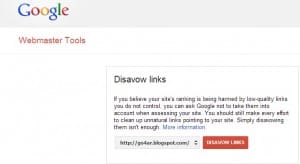
Google employee Eric Cowan said in a topic in the Google Webmaster Help section, in which he pointed out that even if you use a file containing the links that you want to remove from linking, Google may not process this request if it sees that the person who submitted the request did not make any manual effort to remove these links. We had mentioned in a previous post the best ways to clean your site’s external links, which you can benefit from in disavowing external links. Eric said: The link disavow tool should be used if you have done everything in your power to remove the abnormal link, but you cannot remove this link. However, if you used the disavowal tool before you tried to remove external links manually and did not make any effort, then your request for reconsideration may not be successful in this case.
Reasons that may lead to the disavow tool working: Double-check the disavow file and make sure that all links are written correctly, and make sure that the links from which you requested to be disavowed have actually been done. You can find out this by going to the disavow tool and clicking on Disavow link and downloading the list of sites (Disavow tool >> Disavow Links >> Download) Topics that may interest you:
What are the manual procedures in Google “Manual site blocking” Disavowing backlinks: how, method and benefit Matt Cutts: Don’t worry about annoying links Disavow them only External links to your site Penguin Algorithm 2.1 has now been launched 5 steps to clean your site’s external links professionally #webmastertools #disavowlinks
DROPIDEA
We hope this article has added real value to you. At DROPIDEA, we always strive to deliver high-quality content that helps you grow and evolve in the digital space. Follow us for more useful articles and guides.
Admin
DROPIDEA
Latest Articles

Microsoft Gains $3.2 Billion from Its Investment in Anthropic

Zuckerberg: Billions of People Will Have AI Assistants Within Five Years

Microsoft Enters Direct Competition Against OpenAI and Anthropic

Pangram Raises $9 Million to Detect AI-Generated Content



