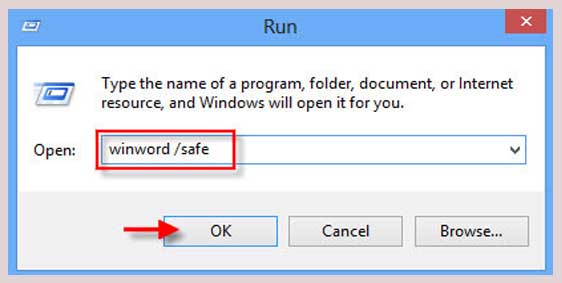
Microsoft Word Is Not Responding: How Can You Fix It? Solution 1: Open the Task Manager Solution 2: Run in Safe Mode Here is how to do it: Read also: The 7 most prominent Microsoft Word add-ons that make it easier for you to use the program professionally Solution 3: Make sure that the latest updates for the operating system are installed Solution 4: Repair the installation or you can choose to repair Windows. This time we will try to repair any damaged files in the Word program itself, which may cause damage or unresponsiveness to the Word program.
You can follow the following steps: You will right-click on the start icon on your computer, and then choose Settings. We will choose Applications, and then we will choose Installed Apps. We will search for Microsoft 365 or Office, and the Microsoft Office software package will appear for you by clicking on the three dots next to it, and choose Modify. A new window will appear for you titled Repair your Office program, and you will have two options: either quick repair, or online repair. If your device is connected to the Internet, it is best to choose online repair to help Word download all the missing or damaged files, and then you will click on the word repair. Delete Word and reinstall If you have reached this point, this means that none of the solutions we mentioned above will respond, but do not despair of the possibility of reinstalling Word again, as it will completely reformat all settings, files, and anything damaged in the program.
You can delete the Word program by following the following steps. You will right-click on the start icon on your computer, and then choose Settings. We will choose Applications, and then we will choose Installed Apps. We will search for Microsoft 365 or Office, and the Microsoft Office software package will appear for you by clicking on the three dots next to it, and choose Remove or Uninstall. By clicking on Remove, Windows will start deleting the entire application, and you can re-download it again via the Microsoft website. Temporary solutions to the unresponsiveness of Word. Microsoft provides you with a web version of its software package, and one of these programs is Word of course. The web version is completely free and you can finish your work through it without any problems. It is considered a temporary solution because the web version does not contain all the features and additions, but it is 90% suitable for all work. You can rely on the Google application package. You can use Google Docs, which is a web service that also resembles the web version of Word, and is automatically linked between all Google services and your Gmail email.
In conclusion, a related article: Download Microsoft Word for free via 5 legitimate methods for all devices. The article was updated on 1/16/2023 to add two new paragraphs
DROPIDEA
We hope this article has added real value to you. At DROPIDEA, we always strive to deliver high-quality content that helps you grow and evolve in the digital space. Follow us for more useful articles and guides.

Admin
DROPIDEA
Latest Articles

Microsoft Gains $3.2 Billion from Its Investment in Anthropic

Zuckerberg: Billions of People Will Have AI Assistants Within Five Years

Microsoft Enters Direct Competition Against OpenAI and Anthropic

Pangram Raises $9 Million to Detect AI-Generated Content



