Solve the problem of low storage space for Android - 7 effective solutions to the low internal storage message
 By Admin
You may see a low storage space message for Android, which is a common problem after your Android phone's memory is full and there is a need to delete files, but this process is cumbersome as it requires searching your files and deleting some photos from your phone, but here we will save you a lot of time to solve the problem of low storage space on Android phones. Low internal storage space for Android: The Low internal storage android message appears suddenly and you do not know what to do, but here we will present quick smart solutions to save you the trouble of lengthy manual searching and deletion. We also present here solutions to save storage space in Android and rely on external sources to store images and data with 100% protection. Let's review some 7 effective steps to solve the problem.
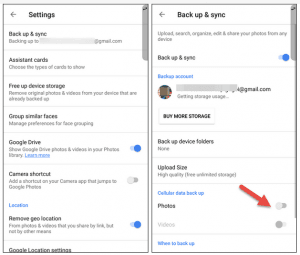
1- Backup Android photos first - instead of deleting your favorite photos and searching a lot, why not transfer them to the free Google Photos service available for Android phones via a simple application. In this way, you will be able to make a backup copy of your Android phone photos via Google’s secure cloud storage platform and you can access and open them at any time. This feature is unique because it enables you to access your mobile phone photos if they are stolen. All you need is to download the application and log in with the old data on your original phone, then go to Settings > Backup & sync and turn on the “backup on” feature. 2- Transfer applications to the SD card. The distinguished Hermit application provides a great solution
For phones with low performance and space, basic applications such as Facebook and Instagram often consume a large amount of storage space and consume the mobile processor/RAM resources. Have you ever thought about trying Light Apps? If you search on Google Play, you will find many instead of basic applications. Read also: How to move applications to SD memory in Android to save storage space - without root
But another great solution to the problem of low storage space for Android is found in the Hermit application with a size of only 2MB. It can replace Facebook and Messenger to save storage space and speed up the mobile phone, as it supports many services within it. It contains famous applications. It is also a light web browser and enables you to create shortcuts to light application icons on the desktop of Android phones. 3- Cleaning the Android cache We advise you to clean the Android cache from time to time by deleting temporary files stored on the system, such as some photos, videos, and some written texts.
Deleting the cache saves storage space and speeds up the process of launching applications. To clear the cache, go to Settings, App Settings, Storage, then click Clear Cache. 4- Delete WhatsApp photos If you are a member of several WhatsApp groups and send many photos with friends, perhaps you should delete the photos and videos of the WhatsApp folder on your Android phone from time to time to save storage space, but why not provide you with a faster solution to delete WhatsApp photos with one click and intelligently, according to their importance?
Explore: The Magic Cleaner application intelligently deletes unused WhatsApp photos. The Magic Cleaner application has a very good filtering technology, as it scans the mobile phone and the WhatsApp application in a few seconds and gives you two lists of junked files and images, one for images that the application believes are not needed now, and another list that it thinks you will need these images and leaves for you. 5- Play music online instead of storing music folders and saving dozens of files in Mp3 format. Why not try relying on music streaming services to save storage space on your phone and discover new music as well. I personally use about 4GB of mobile space for music! Therefore, here we have two great options, the first is Spotify for exploring international music and we reviewed how to play Spotify in previously blocked countries in a dedicated article.
As for Arabic music lovers, the Anghami application is considered one of the best Arabic and international music applications as well, and it does not consume a lot of internet data. 6- Storing files on the external card. This step requires rooting the Android phone, as we will use the “FolderMount” application, which creates paths between the internal storage card and the external storage card in Android phones and transfers installed applications and games to the SD Card with ease and without complicated steps. The application also allows you to specify the primary saving path for browser applications and files directly on the external storage card instead of the main Android mobile space.
7- The Adoptable Storage feature for storage space is considered one of the quick features for the problem of low storage space for Android. It formats the external SD card and makes it part of the main system memory so that it allows you to transfer files from the internal card to the external one easily, but you will not be able to remove it as long as the phone is running. This feature is available for phones with Android Marshmallow 6.0 or higher without the need for rooting, and it also requires the use of a fast Class 10 SD card.
The article has ended. Some of these tips may seriously help you save a lot of storage space on Android phones, especially when the annoying Low internal storage message appears. Do you have any suggestions? Share with us in the comments.
DROPIDEA
We hope this article has added real value to you. At DROPIDEA, we always strive to deliver high-quality content that helps you grow and evolve in the digital space. Follow us for more useful articles and guides.
Admin
DROPIDEA
Latest Articles

Microsoft Gains $3.2 Billion from Its Investment in Anthropic

Zuckerberg: Billions of People Will Have AI Assistants Within Five Years

Microsoft Enters Direct Competition Against OpenAI and Anthropic

Pangram Raises $9 Million to Detect AI-Generated Content



