Displaying popular or most-read articles, or displaying the most recent articles within your site encourages visitors to browse more content published on the site, in addition to making it easier for visitors to access the content within your site, which helps in increasing interaction as well as increasing the visitor’s stay on your site for a longer period. Also, showing the most popular or newest articles on the site may significantly improve the site’s SEO, as showing these articles encourages the visitor to enter and browse them, thus increasing the period of his stay on the site, which in turn is reflected in improving the site’s SEO. The longer the visitor stays on the site, the more search engines trust him and give him priority in being at the top of the search results.
Ways to show the most popular or newest articles on
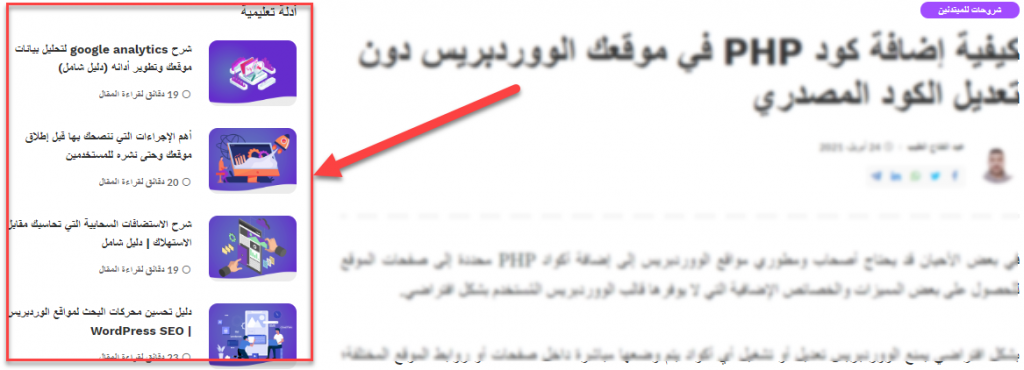
WordPress website In this article, we will learn about several different ways to display the most read or most recent articles on the site. Through these methods, you will also learn how to control the style and method of displaying articles on your site and arrange them in the way you want. In the following paragraphs, we will explain: How to display the most popular articles using one of the plugins The method of displaying the most recent articles using the WordPress editor The method of displaying the most popular articles using a PHP code add-on The image above shows the (Educational Guides) section that appears on the far left of the screen on the WordPress website in Arabic, which contains some useful articles. For readers, this is an illustrative example of what we will do during the current article in which we explain the ways to show readers a group of distinguished articles, along with the current content they are reading within the site. 1. Show the most popular articles using plugins There are many WordPress plugins that can be used to show the most popular articles within your site in the place you prefer.
We will explain one of the free plugins that provides you with multiple options to display the most popular articles on your site in an easy way and without the need for complex programming skills. The WordPress Popular Posts plugin allows you to display the most popular articles within your site, and provides you with many options for controlling the look and feel of displaying those articles, as you can choose from many display designs and appearances. You can also control the type of popular articles and the way they are displayed according to the total number of visits they received, or according to the number of comments. And other options that we will discuss in detail in the following paragraphs.
After installing and activating the plugin on your site, go directly to the WordPress control panel and then go to: Appearance < ودجات ، وقم بالنقر على الودجت الخاص بالإضافة بعنوان (WordPress Popular Posts) وقم باختيار المكان الذي ترغب في ظهور المقالات الأكثر شيوعًا به وليكن مثلاً الشريط الجانبي للموقع: بعد اختيار المكان المراد إظهار المقالات الأكثر شيوعًا به، قم بالنقر على زر (أضف الودجت) ليتم إضافة الودجت في المكان الذي قمت باختياره، وسوف تلاحظ أن صندوق حوار الودجت الخاص بالإضافة يحتوي على الكثير من الخيارات كما هو مبين في الصورة التالية: Title : ضع العنوان الذي يظهر أعلى مربع عرض المقالات الشائعة داخل موقعك. اكتب مثلاً (الأكثر مشاهدة) أو أي عنوان آخر مناسب. Show up to: حدد الحد الأقصى للمقالات الشائعة التي تريد إظهارها.
Sort posts by: You can choose whether the articles will be arranged or sorted according to the number of views or the number of comments made on them. Filters, which is for creating filters on the most popular articles. You will find several options to control the display of popular articles, such as choosing whether you want to display popular articles within 24 hours only or within a week or month, or you can choose All time to select the most popular articles all the time starting from the time the add-on is installed on the site. You can also exclude some articles from being displayed within the Most Popular box through the Post ID(s) to exclude box, in which you put the ID number of the article that you do not want to appear.
This add-on is also distinguished by being compatible with online stores operated by WooCommerce, where you can choose products or their categories to appear within the most popular or most viewed products box within your store: The add-on also shows you many other options as follows: 5. post settin: It has options to control the look and feel of displaying the most popular articles, such as the option to reduce the title length of articles, and you can also choose whether you want to show the summary of the article next to its title or hide it, and the option Display post thumbnail appears in front of you through which you specify whether you want Display or hide the featured image of the article and display only the title and summary or the title only. 6.
stats tag settings: You can choose to display the number of comments below the article title, or display the number of views, the name of the writer, the date of publication, and other information for this article, which helps you fully control the way the section of the most popular articles on your site is displayed. At the end of the widget’s settings bar, you will find the (Theme) tab, which contains a list of 10 options. You can switch between them and choose any of them to change the shape and design of the box for showing the most popular articles within the site: After completing all the settings for the widget, here is an example of the most popular articles box that will appear inside your site in the place you previously chose: 2. Showing and controlling the latest articles from within the WordPress editor Within the WordPress editor, you will find some components that help you insert other articles within the current article or page that you are editing, and one of the most famous of these components is the (Most Recent Articles) component. Once you insert the component into the article or page that you are editing, the settings box for the component appears in front of you, in which you will find many options to control the appearance and method of displaying the articles: As you can notice, you can control the method of displaying the (Latest Articles on the Site) box, such as the ability to display the content of the article or just the title. You also find options for displaying the name of the writer. Or the date of publication, or display the featured image of the article, as well as the order from oldest to newest, or vice versa.
3. Showing the most popular articles using code In this part, we will explain to you another way to show the most popular articles on your site without using WordPress plugins. In this method, we will rely on adding code manually by modifying the programming files of the WordPress template used on your site. To apply this method, you must have the ability to modify the WordPress source code and have good knowledge of the PHP language.
Of course, we always advise you to take a backup copy of your WordPress site before modifying the source code. In order to display the most popular or most visited articles within your site, you must first add code into the functions.php file of the WordPress theme currently used on your site.
Copy and paste the following code before the closing tag
DROPIDEA
We hope this article has added real value to you. At DROPIDEA, we always strive to deliver high-quality content that helps you grow and evolve in the digital space. Follow us for more useful articles and guides.

Admin
DROPIDEA
Latest Articles

Microsoft Gains $3.2 Billion from Its Investment in Anthropic

Zuckerberg: Billions of People Will Have AI Assistants Within Five Years

Microsoft Enters Direct Competition Against OpenAI and Anthropic

Pangram Raises $9 Million to Detect AI-Generated Content



