How to protect a Facebook account - a comprehensive step-by-step guide
 By Admin
With the increase in cyber threats, protecting your Facebook account has become crucial. Hacking your account may put your privacy and personal data at risk, and may lead to serious consequences. In this comprehensive guide, we will explore the importance of protecting your Facebook account, and we will provide you with a set of tips and instructions that will help you effectively secure your account and protect yourself from electronic risks.
Have you ever imagined that your Facebook account might be a target for hackers and hackers? Unfortunately, this reality is more common than ever. Our accounts contain a huge amount of personal information, such as our photos, messages, and contact information.
This information could be used for criminal purposes, such as identity theft or extortion. But don't worry, there are many precautionary measures you can take in order to protect your Facebook account. Want to protect your Facebook account, but don't know where to start?
Don't worry, in this comprehensive guide, we will give you step-by-step everything you need to enhance the security of your account. We will start by introducing you to the most important settings that you should change, then move on to how to choose a strong password, how to deal with phishing messages, and how to detect any suspicious activity on your account. It is worth noting that, according to a recent study published by gitnux, about 25% of Facebook accounts have been hacked, and 70% of victims have been blocked from accessing their accounts.
In many cases, the victim does not realize that he has been hacked until it is too late. In this guide, we will list all the steps to protect a Facebook account in detail. Signs that indicate an attempt to hack your Facebook account Here are some signs that indicate that someone is spying on your Facebook account and intends to hack it: You find strange posts in your timeline. Some of your personal details have been changed (username, birthday, email) You find friend requests sent to people you do not know. Your password has been changed.
Increased amount of spam or suspicious links. Complaints from friends about strange messages or posts coming from your account.
How do you discover that your Facebook account has been hacked?
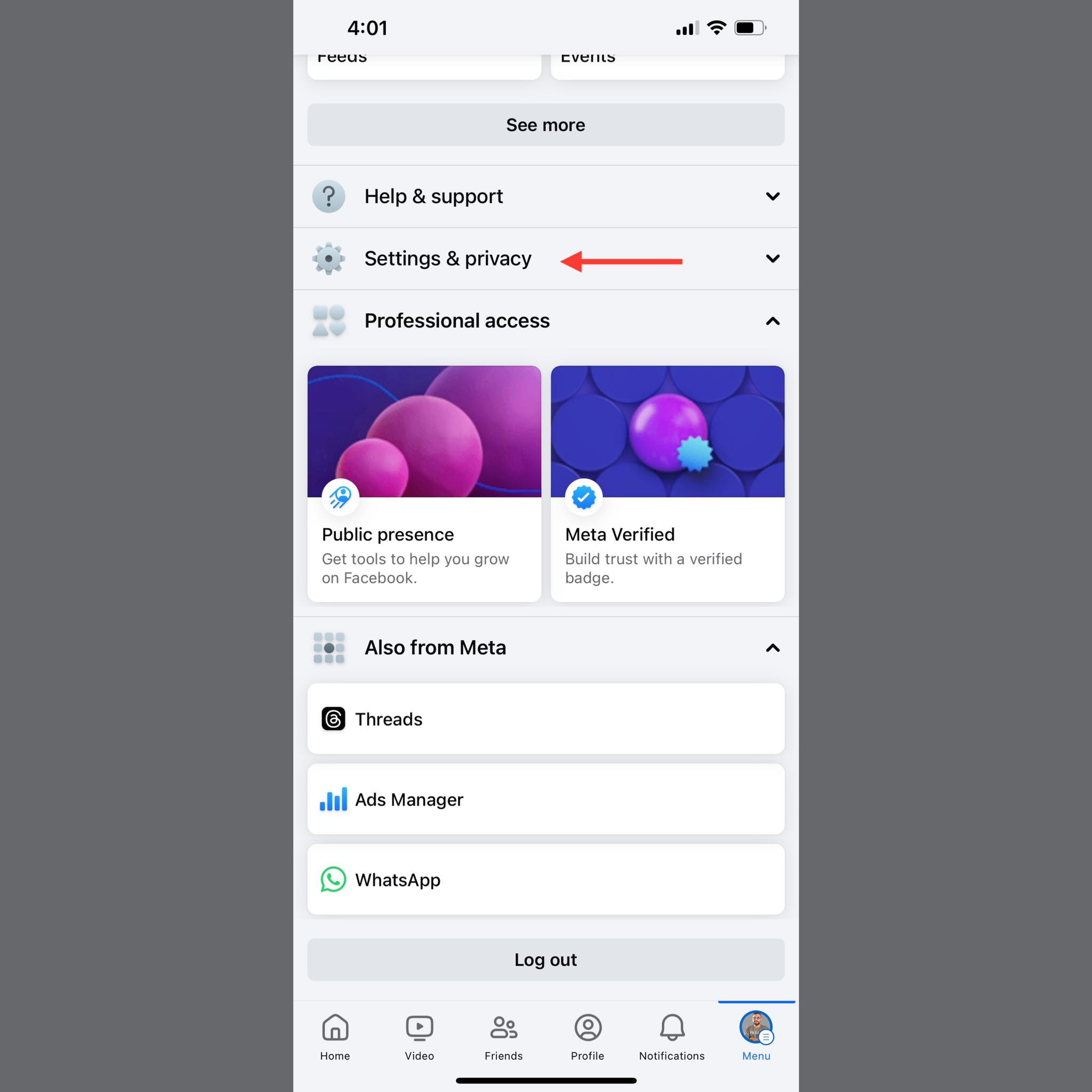
Once you suspect that your account has been hacked, you can easily confirm this by clicking on your profile picture in the upper right corner and then clicking on Settings and Privacy. Next, click Settings. In the upper-right corner, select Password & Security, and then click Password & Security.
Finally, under the Device logins section, make sure that all of your active devices are already linked and that there are no other intrusive devices. How to protect and secure your Facebook account from hacking In order to protect and secure your Facebook account, you need to be very proactive in three different ways: Password Protection Privacy Settings Immunization Against Any Possible Human Errors 1. Password Protection It is easy to make mistakes when it comes to choosing a password.
For example, two-thirds of Americans use the same password for more than one online account, according to a recently published study from (Google, Harris Poll) conducted at the beginning of this year. These types of common mistakes lead to accounts getting hacked every day. Here are some ways to make sure your password is as secure as possible: Create a strong, secure password: Once a hacker or scammer learns your Facebook password, it's over.
The password should be easy enough to remember (or store somewhere) and long enough that it's difficult to guess. One of the best ways to make sure your password is strong is to include numbers, symbols, and a mix of upper and lower case letters. Keep your password safe: If your password is the type that is difficult to remember, make sure you write down the phrase and store it somewhere that only you know.
You can also use a password manager to safely store your computer password. There may already be a password manager on your device, but it's often better to find a password encryption app that isn't built-in. Create a Facebook-only password: As a general rule, you should create a different password for each social media platform you use.
If a hacker gets your Facebook password, you don't want them to be able to access your TikTok, Instagram, etc. accounts as well. Make sure that the strong password you create is only for Facebook. Change your password every six months: You can never be too secure when it comes to password protection.
Changing your password at least every six months makes it very difficult for hackers to crack. This advice applies to any password you have. 2.
Privacy Settings Facebook is aware of the problems that many of its users face when it comes to having their accounts hacked. As a countermeasure, Facebook has provided some privacy settings you can use to help protect your Facebook account: Enable two-factor authentication: You can think of two-factor authentication as an extra layer of protection that prevents unethical hackers from spying on your account. This is done by forcing you to authenticate your account by sending you a text message to confirm that it is actually you logging in.
To activate two-factor authentication to protect your Facebook account: Click on your profile, then open Settings. In the upper right corner, click Password & Security. Under Account Settings, click Password & Security again, and then select Two-Factor Authentication.
From here, follow the on-screen instructions to turn this option on. Use Login Alerts: If you really want to protect your Facebook account, you can receive an alert every time someone logs into your account. Once you know that someone is logged in and not you, you can try to fix the problem quickly before it's too late.
To turn on login alerts, tap your profile picture and go to your settings. Then click Password & Security in both Account Center and Account Settings. In the Security Checks settings, select Login Alerts to protect your Facebook account.
Make your account private: One of the ways hackers use to find out your password is to collect evidence from your personal information. You can limit the personal information these bad people get from you by making your account private. You can do this by opening the Privacy page in your settings, then scrolling down until you find the Lock Facebook account box, and then activate that option so that your account becomes private and restricted to your friends only.
You may also be interested in: 10 steps to take to protect your privacy on Facebook 3. Human Error Ultimately, it doesn't matter how much Facebook account protection you surround yourself with if you allow a scammer to use social engineering against you. Here are some of the best ways to ensure you don't get scammed out of your Facebook account password: Don't accept random friend requests: One of the subtle ways scammers use to get your information is to create fake accounts and add you to their friends list.
If you've set your account to tell your friends your date of birth, for example, an imposter account on your friends list will be notified of your date of birth and then use that information against you. To be safe, only accept friend requests from people you know. Or you can completely prevent friend requests from being sent to your profile if you want.
Use only trusted computers: Avoid using public computers to log into Facebook as much as possible. You never know who the next person to use a computer will be and whether they will be a good or bad person. If you have to use a public computer, make sure to log out of your account as soon as you leave in order to protect your Facebook account.
Don't hesitate to block suspicious people: If someone you're interacting with seems suspicious and you don't know who they are personally, block them. There are a lot of good people on the Internet and there is no need to deal with suspicious people. Carrying out a better blocking campaign for these accounts will enable you to effectively protect your Facebook account.
In conclusion, protecting a Facebook account is not a one-time task, but rather an ongoing process that requires constant vigilance and caution from us. In a rapidly evolving digital world, new threats constantly emerge, making it necessary to update our knowledge of advanced protection methods and take the necessary preventive measures. We should all be aware that our social media accounts contain valuable personal information that could be illicitly exploited by others if it falls into the wrong hands.
Feel free to apply the tips we have provided in this article in order to protect your Facebook account. Remember that you are primarily responsible for the security of your account, and do not wait until something happens to start taking the necessary precautions.
Related articles:
How to temporarily disable a Facebook account - stop a Facebook account without deleting it 7 useful applications if you decide to stay away from Facebook to protect yourself How to open Facebook messages without Messenger installed on your phone
DROPIDEA
We hope this article has added real value to you. At DROPIDEA, we always strive to deliver high-quality content that helps you grow and evolve in the digital space. Follow us for more useful articles and guides.
Admin
DROPIDEA
Latest Articles

Nscale Acquires Anyscale for $1.65 Billion to Expand Its Dominance in AI Infrastructure

How Is AI Accelerating Meta's New App Launches?

Okta Acquires Security Firm Permiso for Around $200 Million

Microsoft Gains $3.2 Billion from Its Investment in Anthropic