How to find out who unfollowed you on Twitter for mobile and computer
 By Admin
Certainly, the Twitter platform is one of the largest social media platforms, along with its biggest competitor, Facebook. Twitter offers a different philosophy that always attracts major companies, businessmen, and influencers. You always see interactions about institutions, businessmen, and celebrities on their Twitter accounts, which makes the platform an important value compared to competitors. Therefore, if you want to start creating content, or own your own project, or even your personal account, and want to know who unfollowed you on Twitter, I will present to you through this article more than one method suitable for all operating systems on how to find out who unfollowed you on Twitter via mobile phone. Or computer. Features of analyzing performance on the Twitter platform The Twitter platform is constantly trying to develop the features offered to users, including recently knowing the number of viewers of your tweets, and Twitter continues to pump out features related to analyzing your performance on the platform, from the number of views, interactions, etc., but so far there is no official way from Twitter to know who has unfollowed you, so I will provide you with more than one method suitable for Mac and Windows devices, as well as Android and iPhone devices. We also previously presented a way to know who blocked me on Twitter, and now we learn a way to know who unfollowed me.
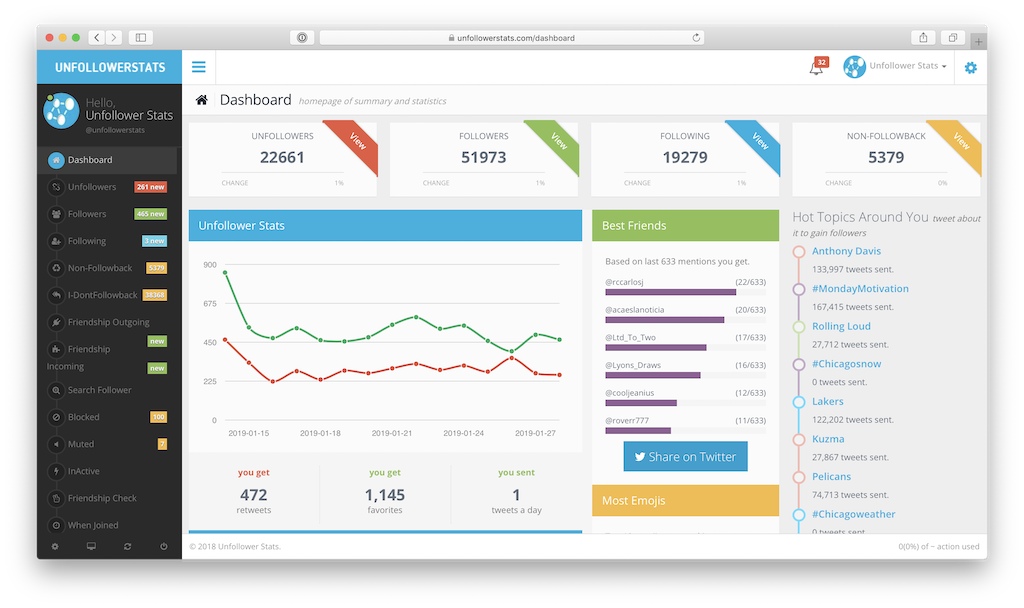
Let us learn how to find out who unfollowed you on Twitter using Circleboom: How to find out who unfollowed you on Twitter via the computer (Windows - Mac). You can get this feature via the computer through many sites, but we will mention to you one of the reliable sites that has been widely used for a long time, which is the Unfollower Stats site. You can access it from here. This site is considered safe to find out who unfollowed you on Twitter, especially because you need to log in to your Twitter account through these sites, so Your data is at risk if you are not trustworthy with this site. One of the good features of this site is that it can be used for free without having to pay any fees. You can get the feature of knowing who unfollowed you for free if your account does not exceed 30 thousand followers, in addition to displaying some ads on the site. However, the Unfollower Stats website also offers many other features in the paid version, which is displaying a history of more than thirty days, in addition to the ability to identify non-interactive accounts and remove them from your account. The website also has an application on iPhone devices through which you can activate notifications to alert you when someone unfollows you.
Knowing the people who unfollowed you on Twitter via your Android phone. We move to phones, with the Nomesigue application to find out who unfollowed you on Twitter. There are many applications available for the same function, but we have chosen the best of them in terms of security and ease of use. The Nomesigue application services are provided through a subscription, and these services include knowing who unfollowed your account on Twitter, knowing mutual friends, in addition to knowing the people you follow and who do not follow you, so the application provides you with all comprehensive information about the followers. Detect who has unfollowed you on Twitter via iPhone and iPad. Finally, we move to the IOS system, with the Who unfollowed me on Twitter application, one of the powerful and distinctive applications that has been available on the IOS platform for many years and I have been using it personally, and as is the case with all IOS applications, you will find the application in the best form and all the elements and tools are easy to handle. You have many features about your followers and a complete analysis of them. The program provides you with information about the complete number of followers, the number of new followers in recent days, in addition to the most important feature, which is the people who unfollowed you on Twitter. It also shows you the number of friends, which are the people you follow and who follow you.
The application comes with a distinctive design, in addition to a night mode as well, and provides you with a graph and a table, showing you the rate of your followers in different time periods starting from a week until the beginning of your Twitter account, and you can change the classification of this table, to the information that is important to you, from the number of followers, interactions, number of tweets and many distinctive characteristics, which gives you a comprehensive analysis of your Twitter account. Read more: How to disable the read message mark on Twitter and know who has read the message Explanation guide: How to open a suspended Twitter account or unsuspend it How to strengthen privacy on Twitter - a comprehensive guide to data protection Note: The article was updated on August 21, 2023 to add a new tool and new useful content.
DROPIDEA
We hope this article has added real value to you. At DROPIDEA, we always strive to deliver high-quality content that helps you grow and evolve in the digital space. Follow us for more useful articles and guides.
Admin
DROPIDEA
Latest Articles

Nscale Acquires Anyscale for $1.65 Billion to Expand Its Dominance in AI Infrastructure

How Is AI Accelerating Meta's New App Launches?

Okta Acquires Security Firm Permiso for Around $200 Million

Microsoft Gains $3.2 Billion from Its Investment in Anthropic