How to change the appearance of Facebook to the new form 2020 and activate the dark mode for Facebook
 By Admin
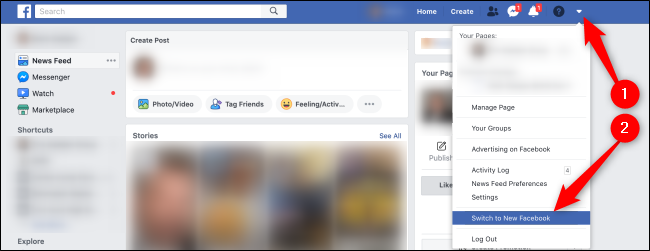
How to change the appearance of Facebook to the new form Related article: How to completely prevent friend requests from being sent to your Facebook profile. Read also: An explanation of activating Dark Mode for all your programs, devices, and operating systems. Facebook Messenger for Windows in a new way. Facebook has also circulated the new form to its various applications across all platforms. The new form has become available through the Facebook Messenger application for Windows, as it has added many features here that differ even from the web version, such as: Receiving notifications for new messages. Dark mode for Facebook Messenger. GIF support. Within conversations, greater support in group video conversations, Group Calls, real-time synchronization of events between all devices. These options can be obtained by simply downloading the application through the supported application store in your operating system by searching for the word Messenger and downloading the official version from Facebook.
Facebook Messenger – Windows Facebook Messenger – MacOS
DROPIDEA
We hope this article has added real value to you. At DROPIDEA, we always strive to deliver high-quality content that helps you grow and evolve in the digital space. Follow us for more useful articles and guides.
Admin
DROPIDEA
Latest Articles

Microsoft Gains $3.2 Billion from Its Investment in Anthropic

Zuckerberg: Billions of People Will Have AI Assistants Within Five Years

Microsoft Enters Direct Competition Against OpenAI and Anthropic

Pangram Raises $9 Million to Detect AI-Generated Content



