In the era of modern technology, applications and smart tools have become an essential part of our lives and daily activities. Among these tools and technologies, artificial intelligence applications are making rapid progress to improve the user experience and daily operations, and make them smarter and more effective. In this context, Galaxy AI is one of these interesting tools that allows smartphone users, whether they use iPhone or Andriod devices, to benefit from the capabilities of artificial intelligence in an easy and effective way.
In this article, we will learn about the capabilities of Galaxy AI and how Galaxy AI can be run for iPhone and Android. What tools does it offer that make it a distinctive tool to use on our devices?
What is Samsung's Galaxy AI?
Samsung's Galaxy AI is an AI feature and platform that aims to improve the user experience on Galaxy smartphones. This tool uses artificial intelligence capabilities to help the user perform daily tasks without resorting to a special professional program for each task, such as translation, taking notes, or even searching on Google. It is available as an app for the Samsung Galaxy S24, Galaxy S24 Plus, and Galaxy S24 Ultra.
It is also expected to be available shortly for a wide list of older Samsung devices. It has also become available for some iPhone and Android devices through the Try Galaxy application, which we will talk about in the next lines. Features provided by Galaxy AI.
Galaxy AI offers a variety of features to its users, the most important of which are: Google Search, as this feature provides the ability to perform an intelligent search on Google for the item you request using artificial intelligence capabilities. Translation Galaxy AI helps translate between 13 different languages, including text and conversations in real time. Chat Assistant The Galaxy AI Chat Assistant can correct spelling and grammar errors in text, or change the style of speech to sound formal, or less formal.
Slow Motion Video Galaxy Assistant lets you add slow motion to any video. Whether it is a ready-made video or captured with the device's camera. Executing commands where the device can be controlled through voice and commands directed to an artificial intelligence application.
Note recording: Notes can be drawn, written, or even recorded with audio and Galaxy AI converts the audio into text. You will then get a set of options to translate or summarize what is written. Photo Assistant: Photo Assistant allows you to edit photos, remove unwanted elements, and add many additional adjustments.
Running Galaxy AI for iPhone and Android Since Samsung is so passionate about its products, it has provided a great marketing tool for iPhone and Android users. It has the advantage of trying out its advanced technologies through an app called Try Galaxy. As Samsung stated, Galaxy AI through Try Galaxy can simulate the experience of owning a Galaxy S24.
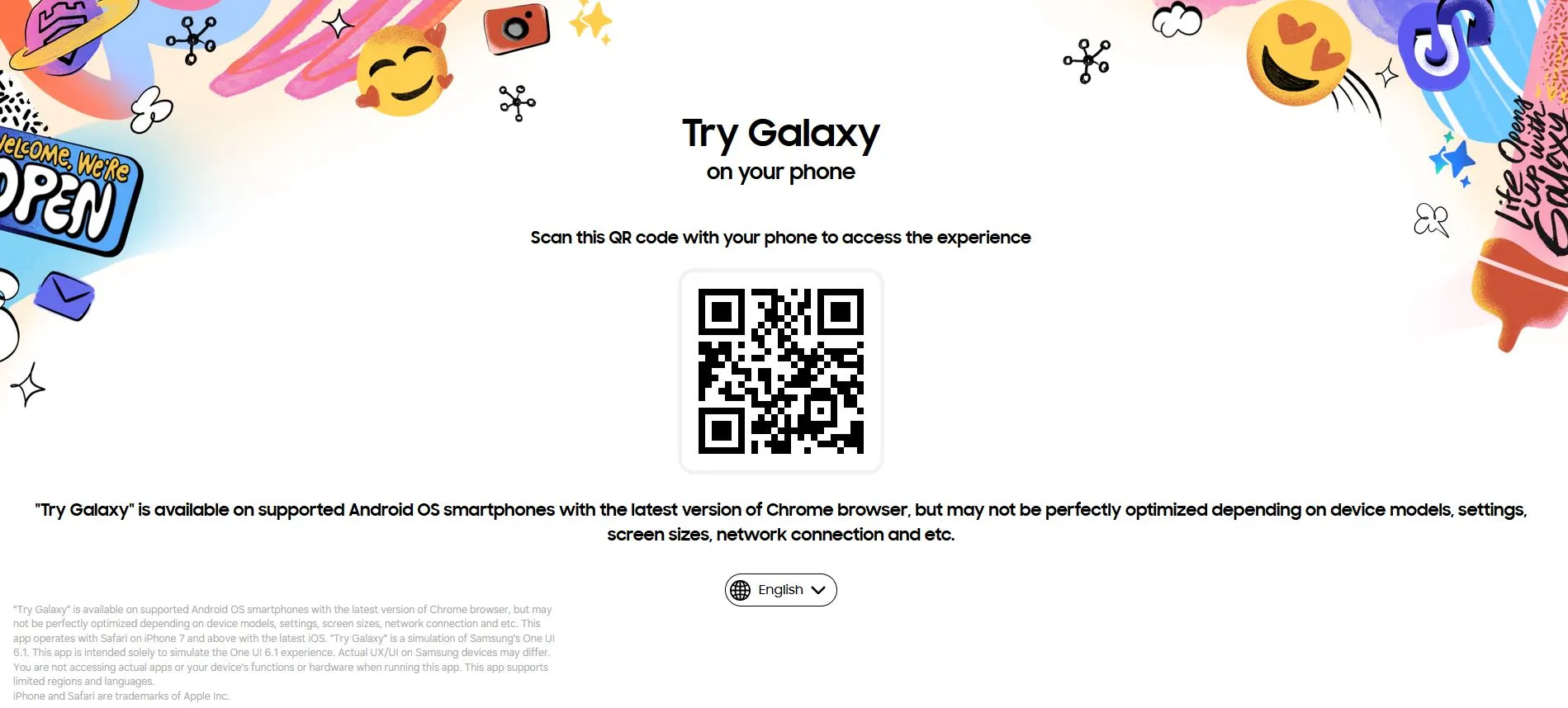
It is important to know that Try Galaxy is not available on the Google Store (Google Play). Alternatively, you can access it through a quick scan here: Click here. Or through the official website: Try Galaxy from Samsung.
How to install Try Galaxy from Samsung To experience Samsung's Galaxy AI for iPhone and Android, you will have to download the Try Galaxy app. This is done by following the following steps: After scanning the QR code through a quick scan from here: Click here. Anzan will show you the URL and all you have to do is click on “Go to Website”.
In the upper right corner, click on the three perpendicular dots to display the browser options, then scroll down and click “Install the application.” After that, an interface will appear in which click on the “Install” option. The installation process will only take a few seconds, you can now open the Try Galaxy app from your device.
After that, the Samsung welcome interface appears, which looks similar to the Galaxy S24 interface. Swipe right, and Galaxy AI tools will appear. You will notice that the tools are always available, without you having to download them every time.
Each tool also provides a video showing how to use it. The tools provided by Try Galaxy, where you will notice the presence of the Galaxy AI’s set of options, which include: Search Circle (Click to Search): This option allows you to search for information about an object, found on a website, on a ready-made image, on a video, or even on a live image while it is captured by the device’s camera. This is done by drawing a circle with a touch operation around the desired item after pressing and holding the Home button.
This process helps the user find information about a person, product, animal, or even a specific physical item, whatever it may be. Live Translate: This feature makes conversations available in real time. Therefore, when making a phone call with another person, you can ask Live Translate to translate what the other person is saying into a specific language, and translated text will appear on the screen to continue the conversation.
This feature supports 13 different languages. It is also available for translating notes and other texts. Writing notes (Note Assist) Note Assist
Responsible for summarizing written notes in the Samsung Notes application. It will also correct any spelling or grammar errors when writing. It will also change the text formatting to make it look neater.
He will arrange the notes. Chat Assist: This feature helps you write messages to be more formal, or completely informal. It supports 13 different languages, so you can write texts in the language you prefer.
Photo Assist Photo Assist helps in editing and enhancing photos through distinctive tools. The feature can remove reflections in the image and unwanted objects without leaving any traces. While the rest of the options available in Try Galaxy revolve around marketing the features of the Galaxy S24, and the features that are available within it.
In conclusion, the use of modern technology such as the Try Galaxy application and artificial intelligence capabilities such as Galaxy AI can contribute to improving users' mobile phone experiences. Thus increasing the trend towards achieving comfort and luxury from new technological techniques. This aims to improve people's lives and reduce time wasted in carrying out their daily tasks.
Read also: Explaining Microsoft Copilot’s use of artificial intelligence and downloading it on Android and iPhone
DROPIDEA
We hope this article has added real value to you. At DROPIDEA, we always strive to deliver high-quality content that helps you grow and evolve in the digital space. Follow us for more useful articles and guides.

Admin
DROPIDEA
Latest Articles

Microsoft Gains $3.2 Billion from Its Investment in Anthropic

Zuckerberg: Billions of People Will Have AI Assistants Within Five Years

Microsoft Enters Direct Competition Against OpenAI and Anthropic

Pangram Raises $9 Million to Detect AI-Generated Content

Encore AI تجمع 30 مليون دولار لبناء وكلاء ذكاء اصطناعي يتعلمون من مكالمات العملاء
Related Articles

ASUS ROG Flow Z13 (2025) available: Everything you could dream of in a gaming tablet.
Pay attention: 10 symptoms that confirm damage to the hard disk and the need for your quick intervention!
