What is the best browser for Android? – We explore the 7 fastest mobile browsers alternative to Chrome
 By Admin
Browsing applications such as Google Chrome, Firefox, and even UC Browser occupy a huge number of Android phone users. Although they perform the same function, each application has its own feature that attracts users to it. But this will not prevent developers from creating new browsers that may gain widespread fame and appear on the scene. Here is a comprehensive collection of the best mobile browsers from which you can choose the best browser for Android that is characterized by simplicity, speed, and meets all your browsing demands safely.
The best browser for Android Yes, there are an incredible number of browsers available on mobile, but there are only a few that are worth considering and trusting as well. This is because all users rely on one of only two available Joule browsers, the most prominent of which are Google Chrome and Mozilla Firefox in terms of speed and features. That's why the only thing you gain from using another browser and trying Chrome alternatives is a slightly different interface.
But some developers have added really useful features on top of what Mozilla and Google offer, and that's why we're here, and we'll help you find the best alternatives. Note: The article was updated on January 2022 to add new browsers based on the results of the latest web browser tests in terms of speed and features. In this article, we will review some of the best web browsers available for mobile. You've no doubt heard of some of them, but we'll go into great detail about them in order to help you decide which one is best for you.
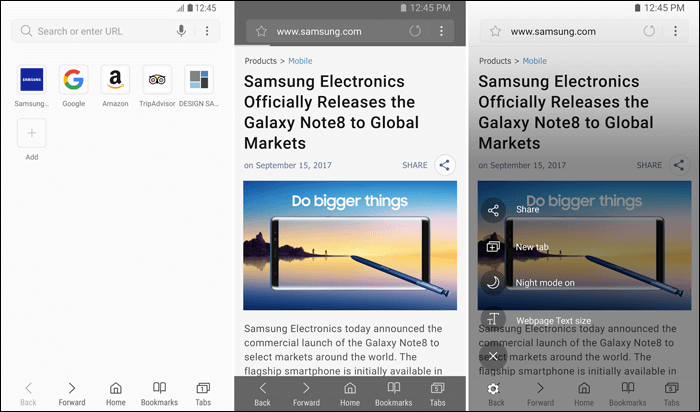
Samsung Internet Browser Samsung Internet Browser is the default browser for modern Samsung phones, and for other phones you can use the application normally after downloading it from the store and it is considered the best browser for Android compatible with Samsung devices. The browser has amazing features that help you browse easily, such as logging into websites with your fingerprint, controlling the size of texts on any web page, and night mode...however, you can install add-ons to enhance the experience more and more. Side by side, the browser has a very simple design and high security features, in addition to being a battery saver.
So, you can rely on it and try it without hesitation. Samsung's browser is based on the Blink browser engine, so it's fast and smooth. The browser also comes with all the basics and supports ad blocking for Android by downloading one of the suggested add-ons.
However, the add-on must be downloaded from Google Play as a new app, which can be a bit of a hassle for users with limited internal storage. You can also customize the look of your browser and sync your bookmarks, saved pages, and more with your Samsung Account. Additionally, Samsung recently added support for fingerprint blocking in the browser.
(Download the application) The famous Opera Mini browser has multiple applications available on the Play Store, but the best is the Opera Mini browser application, as this browser has enough features that prompt you to use it immediately. Perhaps the most famous of them all is saving data for package owners, as you can browse websites without worrying about internet consumption with this application, which compresses images and prevents the display of ads and unnecessary elements within websites to reduce consumption, and this is what makes browsing through it faster than with any other browser. Opera Mini is the browser to get if you live in an area with poor connectivity or expensive data plans. It is quite light and does not take up a lot of space, passes everything you do on the internet through its own servers which ensures a smooth user experience, removes all the unnecessary things to make web pages smaller, and saves up to 90% of data.
This browser also comes with a built-in ad blocker and an offline file sharing tool. You can use the file sharing tool to share files with friends and family at high speeds. (Download the application) Related article: How to install Google Chrome extensions on the fast Opera browser!
Windows 10 Browser for Android Microsoft Edge Microsoft Edge is another Chromium-based browser that is an excellent choice if you are part of the Microsoft ecosystem. It's fast and comes with a bottom navigation bar that makes operating the browser a breeze, given the ever-increasing size of smartphones in our world today. You also get pretty much all of the browser's main features, including sync support, full blocking support for annoying ads, and the ability to block trackers.
Yes, the Microsoft Edge browser will no longer be limited to Windows 10 users only, but also to users of Android phones or even iOS. The application includes all the features of any other browser, such as protection, site saving, and synchronization. But the really special thing about it is the Continue on PC feature, as this feature allows you to complete what you are currently browsing from your phone directly on your computer as long as it is running the latest version of Windows 10.
With the click of a button, open windows are synchronized between devices immediately, so it is a feature worth trying. Additionally, Edge lets you maintain a clean homepage by removing all Microsoft news items, most visited sites, and photo of the day. (Download the application) DuckDuckGo Privacy Browser As its name suggests, DuckDuckGo Privacy is a web browser that focuses on user privacy and helps you take control of it.
The browser isn't particularly feature-rich, but you don't end up using it for features that aren't found in other competing browsers. For example, it automatically blocks third-party trackers and requires participating websites to stop sharing your personal data with other companies. This browser also gives all websites a score based on their privacy and security practices and shows how much it can increase that score.
Plus, you get a nifty button to clean up all your browsing data with one click. (Download the app) Vivaldi Browser Vivaldi is a relatively new browser on the market. However, it has a lot of features, including almost everything you need.
For example, there's a built-in ad and tracker blocker, support for writing notes while browsing, dark mode, QR code scanner, and sync support. You can also customize the browser to your liking, take full-page screenshots, and translate different websites. It is also based on Chromium and uses the Blink browser engine.
It has many basic browsing functions such as dark mode and incognito mode with an ad blocking function built into the app. (Download the application) Read also: An explanation of activating Dark Mode for all your programs, devices, and operating systems. Puffin Web Browser is the Puffin Web Browser where privacy protection, activity encryption, Internet consumption saving... and other advantages come together in one place. Not only that, but it provides you with tools that may make your phone browsing experience unique, as you can play online games using a joystick or forcefully display the mouse cursor on a web page and control it through it.
There is not one or two features that motivate you to use it, but there are many, so we urge you to try it to discover and enjoy these advantages. (Download the app) Kiwi Browser Kiwi Browser was the first mobile browser to support Chrome extensions for desktop. It is open source and has a built-in ad blocker, encryption protection, dark mode, and background video playback.
The browser also automatically blocks mining trackers and allows you to move the address bar to the bottom for easier access. Additionally, you can choose a dedicated folder to save downloads and block annoying notifications. If you're changing your phone, Kiwi allows you to export your bookmarks to transfer to the new device.
The browser hasn't been updated for a while this year, which has people wondering if it will stick around, but it's starting to receive updates again. (Download the application) How to test the speed of an Internet browser? At this point, you can rely on more than one service to measure the speed level of the Internet browser and do not take the results of one site as a certainty, as several online services test the speed of the Internet and not the browsing and its contents.
Therefore, rely on more than one source for your experience, as the sites mentioned in this article were tested based on several global browsing speed measurement services, such as the BrowserBench package, which is a group of 3 powerful tools whose features we learn about in the following points: Speedometer Test: It runs more than 450 web applications in rapid succession to test the browser’s flexibility in running several sequential browsing operations and gives you an estimated average in the browser speed results that shows you the maximum number of web operations per minute that the browser can perform. JetStream test: Here JetStream tests heavy web operations that are not common in use. It is a more difficult test for mobile browsers to determine its ability to execute operations smoothly. Here you can actually know the best browser for Android from its ability to skip the test that focuses on the browser’s graphical processing and heavy loading operations. MotionMark test: This test focuses on the browser's graphics processing and its ability to display movements and transitions quickly and easily.
It also tests several 2D elements, which is an important test in the browser's ability to play videos and various graphics. Summary: We reviewed together many mobile browsers that are useful to you in all uses and have several features, from which you can choose the best browser for Android, the most widely used alternative to Google Chrome, according to statcounter’s global statistics. But some people may suffer from the slowness of popular browsers or want to try something new.
You can use two browsers together on mobile and benefit from both. We advise you to try the browsers mentioned in this article and tell us in the comments, which browser do you like best for your Android phone?
Related article:
How to cancel annoying website notifications in Google Chrome and other browsers 9 solutions to address the Your Connection Is Not Private problem in the browser The best browser for iPhone that supports dark mode and browsing blocked websites
DROPIDEA
We hope this article has added real value to you. At DROPIDEA, we always strive to deliver high-quality content that helps you grow and evolve in the digital space. Follow us for more useful articles and guides.
Admin
DROPIDEA
Latest Articles

Microsoft Gains $3.2 Billion from Its Investment in Anthropic

Zuckerberg: Billions of People Will Have AI Assistants Within Five Years

Microsoft Enters Direct Competition Against OpenAI and Anthropic

Pangram Raises $9 Million to Detect AI-Generated Content



