Explaining the All in one SEO plugin to improve your WordPress site’s SEO
 By Admin
The All in One SEO plugin is one of the most popular WordPress plugins used to improve and customize the SEO settings for WordPress sites, which has various customization features. More than 2 million WordPress users around the world rely on the All in One SEO plugin to improve the appearance of their sites in the results of various search engines. The plugin meets the needs of website owners from various specializations, as it provides distinctive solutions for owners of news sites and content sites, as well as online stores, where it provides many product SEO options, in addition to the feature of creating and customizing sitemaps, which is something that most other plugins do not provide.
Features of the All in one SEO add-on: The add-on provides
There are many options for adjusting and configuring internal SEO for WordPress sites of various specializations, and it contains simple control options that can be easily accessed from within the control panel. Here are the most important SEO options that you can benefit from: Archiving pages and articles: The add-on provides the ability to specify a title and description for the site’s pages and articles to speed up their archiving in search engines.
Customizing the format of displaying content on social media platforms: Contains
Adding options to adjust the display of content when published on social media sites, where you can customize titles, descriptions, and images for the content that is shared via social media. Creating sitemap files: Once the add-on is installed, the sitemap file is created directly automatically, and unlike many other SEO add-ons, you can modify the sitemap file options and not be satisfied with the automatic version that the add-on creates. Alert search engines of updates: The add-on alerts search engines of any update you make within your site, which speeds up the process of archiving site content.
Ease of linking from Webmaster Tools: You can easily link your account in Webmaster Tools, whether Google or Bing, from within the control panel. Product SEO support: If you use one of the e-store add-ons such as woocommerce, the add-on will help you set the titles and descriptions of your products in a way that helps improve their appearance in search engines. Support for image SEO: The add-on contains a special attachment for image SEO, which helps in preparing titles and descriptions for all images within the site, even if you do not set them yourself, which helps images within your site appear in search results for images.
Video sitemap support: One of the very important extensions in the add-on is the video SEO extension, which creates a sitemap for the videos within your site, which helps them appear in search results in an organized manner. Local SEO support: One of the most important accessories that the add-on provides you is creating profile files for search engines that contain the business name, address, and contact information, which helps your business appear on search engines in an organized and professional manner. Activate redirection: The add-on contains an addon for redirecting links to pages that do not work on the site as a result of error (404).
News site map: The add-on also contains a special extension for news sites, where sitemap files are created that provide Google with organized data about the news that is published on the site, and thus the site gets the advantages of displaying the content of news sites within the search results. A comprehensive SEO analysis: The add-on contains a special add-on for analyzing the strengths and weaknesses of the entire site’s SEO, which helps solve the SEO problems facing the site to obtain better results. Read also: SEO Guide for WordPress Websites | WordPress SEO Installing the All in One SEO plugin and configuring its general settings The plugin provides an assistant program to configure the general SEO settings within your site, by installing the plugin and activating it on your site first through the methods that we explained in order to install and activate WordPress plugins.
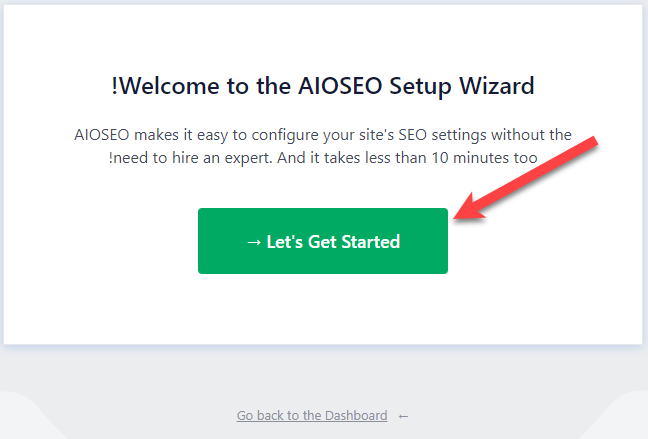
Once you install and activate the add-on directly, the plugin will open in front of you, providing you with the ability to configure the necessary SEO settings. The following tab will appear in front of you, and you can click on the green button: After that, a window will appear for you from which you can choose the specialty or field of your website, whether it is a blog, a news site, or anything else. This step is useful in providing the best SEO settings for your site after that: After that, a window will appear in front of you to write the title, the descriptive text of the home page, which is the title that you want to appear in search engines when the home page appears on it, and from It is important that you include the target word for your site within the title and description of the site’s home page: After that, a window will appear for you to choose from if your site is a personal site (a person) or an official site of an organization or institution. In this window, when you choose the type of site, you write the main contact information, as this information may appear in the search results, which helps increase the rate of clicks on your site’s links: After you finish completing all the settings required of you by the installation plugin, the add-on will directly prepare your site for SEO automatically, as Sitemap files are created automatically without your intervention, and the rest of the other SEO settings are also configured within the site.
After installing the add-on, you can access at any time the statistics tab within the add-on control panel, which shows you a report of the most important SEO problems that your site suffers from, and thus you can work on improving it: The most important SEO options provided by the All in One SEO add-on. After we completed the add-on installation and set up the general SEO options within the site, we now begin to review the most important options and tools that the All in One SEO add-on provides to improve the site’s SEO and the way it is displayed in search results. General SEO statistics and competitor analysis from within the add-on control panel. You can enter the SEO analysis tab to see the percentage of compliance of your site’s content with the SEO rules. You can also find the analyze competitor site tab, through which you can add a link to one of the sites competing with you to see complete statistics about the site. Thus, you can benefit from competitors’ SEO settings to develop your site: Control the SEO of all types of content within the site when entering the Search appearance tab from within the special control panel. In addition, you can go to the (content types) tab, which upon entering shows you all Types of content published on your site, such as articles, pages, products, etc.: When you access any type of content that appears in front of you, you can control its SEO options through a number of tabs that appear in front of you, through which you can control the way and appearance of its display within the search results in various search engines: SEO options for articles on your WordPress site When you write a new article on your site or edit a previous article, you can scroll to the bottom of the article editing page to find the SEO options box for adding All in One SEO, through which you can control all the special SEO settings. By article.
Not only that, but you can control the way the article is displayed within the search engines on the desktop screen or the mobile phone screen, through the icons for switching the display method indicated by the arrow: You will find that you can configure the SEO setting for the article whether on the search results that appear on the desktop computer or the mobile phone, and thus it can provide a user experience for site visitors from the phone that is completely different from site visitors from the desktop, which gives your site an additional advantage over your competitors, as there are some components that are important to show only to mobile users. Don't worry about other users. After choosing the display screen for which you want to configure the SEO settings, you can now write the title and descriptive text of the article that you want to appear in the search results: You will also find a field to write the target word for the article, and in this field you specify the word that you want your article to appear in the search results when a visitor searches it in the search engine. Read also: Meta Data - and how to use it optimally in WordPress. You can also write additional target words that you want to appear in search engines as the add-on will provide you with a lot of advice on improving the appearance of your content on those words. Then in the last field you will find a special tab for analyzing the SEO of the article that contains the strengths and weak points to work on fixing them: You will also find a tab for sharing on social media platforms where you can choose Facebook and Twitter to adjust the settings for sharing the article on each of them: through the social media platforms settings tab. Social You can write a title and description for the article that appears only when shared on social media platforms such as Facebook. You can also specify an image that appears with the article when sharing it on Facebook: As you work to improve the SEO of the article through all of these options, a notification will appear at the top of the article’s editing page showing you the SEO quality percentage. When you click on it, a wide tab opens for you containing all the SEO parameters that you must work on improving to make the article 100% SEO compatible: SEO options for your WordPress site pages SEO options for WordPress pages WordPress is the same as the SEO settings for articles, where you also find options for adding a title and SEO description. You can also control the options for publishing the page on social media sites, such as customizing the title, description, and image that appear when publishing the page on Facebook or Twitter: SEO options for products within your online store. The same options for articles and pages are also found when you create a new product inside your store or edit a previous product, where the SEO options for the product appear, and you can add a title and description of the product that appears on search pages, and in the same previous way you can control the options for sharing the product. On social media sites from within the (Social) tab: Read also: Improving the SEO of your online store in 11 practical steps. Do not forget that whether you are editing the SEO of articles, pages, or products, you can each time specify the SEO options for the desktop screen as well as the SEO options for the mobile phone screen if you want to separate the SEO experience for phone visitors from the rest of the visitors: Note when entering the Schema tab, you will find that the extension automatically determines the type of content for you, in order to facilitate understanding the type of content for engines. Search and thus improve the site’s appearance in search results. The image shows from within the Schema tab of a product page on the site, where the content type was automatically determined as Product: Also, when you enter the Schema tab of a page, you find that the content type was set as a web page:
Likewise, on the article page, you will find the content type: Article: Conclusion In the end, the All in One SEO add-on is one of the distinctive add-ons that site owners need to know about. It is easy to customize, and it also provides you with an auxiliary installation program that runs immediately after installing the add-on. Always try to focus on the content of your site so that it provides the best user experience to your visitors, because adding all in one SEO and other additions is only an auxiliary factor that helps you adjust all the settings that make search engines crawl the content of the site with ease, but your appearance in advanced search results depends primarily on the user experience and the extent of the benefit that your visitors get.
DROPIDEA
We hope this article has added real value to you. At DROPIDEA, we always strive to deliver high-quality content that helps you grow and evolve in the digital space. Follow us for more useful articles and guides.
Admin
DROPIDEA
Latest Articles

Microsoft Gains $3.2 Billion from Its Investment in Anthropic

Zuckerberg: Billions of People Will Have AI Assistants Within Five Years

Microsoft Enters Direct Competition Against OpenAI and Anthropic

Pangram Raises $9 Million to Detect AI-Generated Content



