Explain how to change the payee name in AdSense
 By Admin
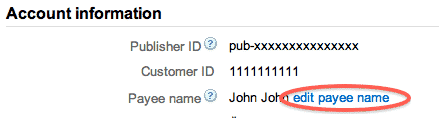
Although the Terms and Conditions do not allow transfer of ownership of accounts, you may update the payee name to correct any typos or to make adjustments due to death, marriage, or merger of partners. In most places, you will have the option to change the payee name within your account by following these steps: 1-
Log in
To your AdSense account. 2- Go to the Account Settings page.
3- In the Account Information section, click on Edit Payee Name.
How to change the payee name with Google AdSense 4-
Review the important notes about payee name changes, accept the terms, and continue. 5- Enter the payee name you want and save the changes. The change to the payee's name will take effect during the next possible payment cycle.
Changes made before the 16th of the month also affect the current month's payment, while changes made after that date don't take effect until the following month's payment cycle. If you are in one of the following countries, you will not have the option to update the payee name on your account.
Topic contents Toggle Algeria Bahrain Bangladesh Brazil China
Egypt India Indonesia Jordan Kuwait Lebanon Libya Malaysia Morocco Nepal Oman Pakistan Palestinian Territories Philippines Qatar Saudi Arabia Singapore Sri Lanka Thailand Tunisia United Arab Emirates Vietnam Yemen Algeria Bahrain Bangladesh Brazil China Egypt India Indonesia Jordan Kuwait Lebanon Libya Malaysia Morocco Nepal Oman Pakistan Palestinian Territories Philippines Qatar Saudi Arabia Singapore Sri Lanka Thailand Tunisia United Arab Emirates Vietnam Yemen If you want to change your payee name and you reside in one of these countries, you must close your account and submit a new request with the payee name you want. Please follow the following steps.
Fill
Cancellation form. Your current account will be closed. When you receive notification that your account has been closed, you can
Submit a new request using the new payee name. When your application is accepted, replace the existing AdSense code on your site's pages with the code generated from your new account.
All the information above is documented information from the Arab Publishers Support Center. #GoogleAdSense
DROPIDEA
We hope this article has added real value to you. At DROPIDEA, we always strive to deliver high-quality content that helps you grow and evolve in the digital space. Follow us for more useful articles and guides.
Admin
DROPIDEA
Latest Articles

Microsoft Gains $3.2 Billion from Its Investment in Anthropic

Zuckerberg: Billions of People Will Have AI Assistants Within Five Years

Microsoft Enters Direct Competition Against OpenAI and Anthropic

Pangram Raises $9 Million to Detect AI-Generated Content

Encore AI تجمع 30 مليون دولار لبناء وكلاء ذكاء اصطناعي يتعلمون من مكالمات العملاء
Related Articles

ASUS ROG Flow Z13 (2025) available: Everything you could dream of in a gaming tablet.
Pay attention: 10 symptoms that confirm damage to the hard disk and the need for your quick intervention!
