Convert PDF to Word or Excel file that supports Arabic - 6 programs to convert Office files with excellence
 By Admin
In today's ever-increasing world of file transfers and usage, PDF files have become one of the most popular ways to share and transfer documents in a unified format. However, the problem that many people suffer from is how to convert PDF to Word or Excel file. The widespread spread of such formats has made it urgent to use programs that convert PDF files to doc or docx that can be edited, as these programs help you open regular PDF files in Microsoft Office so that you can edit them.
How to convert pdf to word? Although this feature is available in Microsoft Word, it is called PDF Reflow, and you can specify the file format when saving and choose the preferred format, but it remains limited in terms of settings and customization. There are also a number of free programs available that can convert PDF to Word, but they also provide a very limited conversion service that is not like the one found in the best PDF editing program.
Specialized Therefore, in this article, we explore some professional programs to convert Office files between them and their various formats while preserving the file format and quality. The best programs for converting Office files with excellence. In this article, we will talk about the 5 best programs for converting PDF files to a Word or Excel file that supports Arabic and a number of other languages. These programs also support converting all types of Office files into office formats suitable for your work.
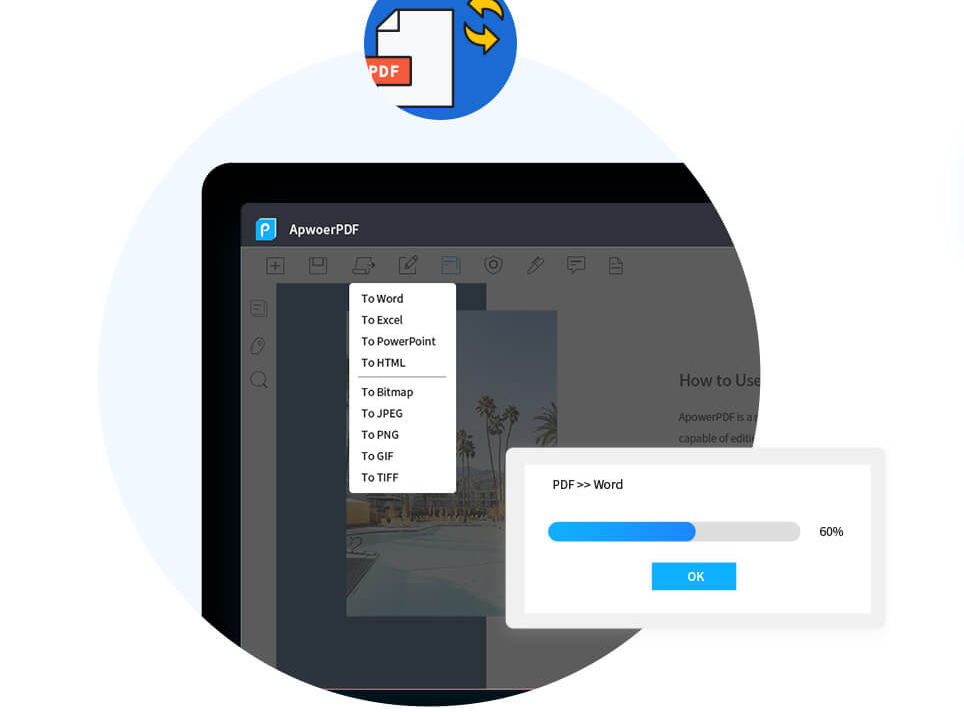
ApowerPDF ApowerPDF has many free PDF editing tools that enable you to read/create/edit e-book files with ease. It also enables you to convert the format of a PDF file, convert it to an image or a Word file to edit texts, and then save it again as a PDF file. Through it, you can save the PDF file in another format, such as
PowerPoint, PPT, Excel, HTML, or image in any JPEG/PNG format while keeping the file format the same without changing.
It also supports many languages, including Arabic and English. (Download the program
APOWERPDF
Adobe Acrobat is the original developer of the PDF format, so Adobe Acrobat should be the leading program in the market. It is definitely a feature-packed program which includes the ability to convert PDF files to Excel files for use in Excel spreadsheets. Working on Adobe Acrobat is easy while preserving data without the need for reformatting.
In Adobe Acrobat you can simply open the PDF file you want to export, click on the Export PDF tool and then choose the format you want to convert to such as Excel Workbook, or XLXS and then export. This can be done using any device including your cell phone. Adobe Acrobat can convert scanned PDF files (OCR), however you can select the data you want to convert, instead of having to convert the entire table from PDF to Excel or Word. Unfortunately, the Adobe Acrobat program is not free, as the price of the version intended for use on the Windows system is set at $12.99 per month.
(Download the Adobe Acrobat program) As for the version intended for both PCs and MAC devices, the price is $14.99 per month. Read also: The easiest way to save a Word file as an image or PDF in seconds!
The best PDF editing applications for Android that you can use
Try it now for free. Nitro Pro supports all Microsoft Office file formats. It is a simple and simplified application that allows you to convert PDF files to Word documents or Excel files within seconds. Using the application you can edit all images, text, and pages stored in a PDF document and transfer them to an Excel spreadsheet just like Adobe Acrobat. The great thing about this software is that it is a cloud application, where you can access and edit documents from any smartphone, tablet, or computer.
The program includes tools that allow you to easily share and view files. Nitro Pro pricing starts at $126 per single-user license, but there are discounts for bulk purchases. (Download the Nitro Pro program) You can sign up for a free 14-day trial to see if the program suits you.
PDFZilla program: Most applications for converting PDF to Word or Excel are only in English, which is not useful to many, especially if you work in an international company that needs to deal with many languages. Not only is PDFZilla an incredibly powerful converter, it supports more than 20 languages, including German, French, Italian, and Spanish. The program is also easy and quick to access, allowing you to convert PDF files in just three clicks.
You can convert PDF documents to Word, Excel, Text, JPG, GIF, PNG and more file formats. You can purchase the program for $29.95 and it only works on Windows. (Download PDFZilla) PDFelement Most programs for converting PDF to Excel files have many features, and PDFelement is not much different from them, as it was designed for professional users who need a tool to edit, convert, and create PDF documents.
What's more, the program works on Windows and Mac, with an iOS app as well, allowing you to convert and edit documents on the go. PDFelement comes with a built-in Optical Character Recognition (OCR) tool, which means you can annotate, and add other documents to PDF documents. The standard package of the program is priced at $79.95, while the professional package is priced at $129.99.
(Download (PDFelement program). SmallPDF program is a very easy-to-use program that allows you to convert PDF files via the website from anywhere you are. There is also a downloadable application for people who want to work in offline mode and it works on Windows and Mac systems.
Summary: The previous programs can convert PDF to Word or Excel. You can also examine within the options and you will find support for converting Microsoft Office files to several other formats. While its basic function is to open and create PDF files or edit their content, then choose to save in your preferred format.
Other related articles:
Explaining how to convert numbers from English to Arabic in Microsoft Word in a minute! The 5 best sites for downloading Microsoft Word templates ready to be written on. The best site for editing PDF files in moments - 5 sites for creating PDF, adding effects, and writing accurately. Share with us the name of another program or site that you use to convert Office files between each other.
DROPIDEA
We hope this article has added real value to you. At DROPIDEA, we always strive to deliver high-quality content that helps you grow and evolve in the digital space. Follow us for more useful articles and guides.
Admin
DROPIDEA
Latest Articles

Microsoft Gains $3.2 Billion from Its Investment in Anthropic

Zuckerberg: Billions of People Will Have AI Assistants Within Five Years

Microsoft Enters Direct Competition Against OpenAI and Anthropic

Pangram Raises $9 Million to Detect AI-Generated Content



