This may seem like a strange question, but it might be interesting to ask yourself. Contrary to what one might think, is there a way to turn on Wi-Fi with Mobile Data? Your Wi-Fi internet connection, as well as 4G data.
Sometimes we may notice that the Wi-Fi is noticeably slow or intermittent, and you do not want to disconnect completely. We would like to inform you that there is actually a way to do this, but why would someone do this?
Why would you want to take advantage of both connections?
In this article, we'll first explain to you what you can use to do just that, and how to use mobile data and Wi-Fi at the same time. How to operate Wi-Fi with Mobile Data + Wifi Due to the open source nature of the Android operating system, there are no limits to the capabilities of the features that developers can add into their applications. Or rather we can say that developers can provide more new features to the operating system itself.
Hence, users are always looking for ways to get the most out of their Android smartphones. However, we have a cool trick for you. If you're tired of waiting for uploads to complete, we have a great solution for you.
When downloading a file, your phone can choose between your mobile data and a Wi-Fi connection. The default is to go for any one of them. But most users don't know that you can change this setting, where you can simultaneously use mobile data and Wi-Fi connection to download your files at double speed.
Imagine the download speed of a phone that uses 3G or 4G mobile data as well as Wi-Fi as well. So, your phone will use Wi-Fi and mobile data simultaneously to download files with faster speed and better connectivity. After that, you won't have to wait long for the download to finish.
Maybe that download you want to complete quickly is a heavy app or a high-resolution video, and you can benefit from Wi-Fi speeds and mobile data together. This will be very useful for most Android users, and it is easy to use. But due to some permission restrictions in Android, you need to root your phone.
Related article: Post-root applications for Android: The 5 most important applications after rooting. But first, this magic trick allows you to do the following: Reduce connection interruptions: that is, network instability. Once one is too low, your phone automatically switches to the other, without losing quality. Ensure a stable network: Logically, avoiding network loss means that you stabilize your connection greatly.
It's an ideal mode for playing games or watching a movie, for example. Improve download speed: When downloading a file, if your internet connection is unstable, the speed will be limited. Using this technology, you can enjoy a fast and stable connection without interruptions, thus ensuring high download speed.
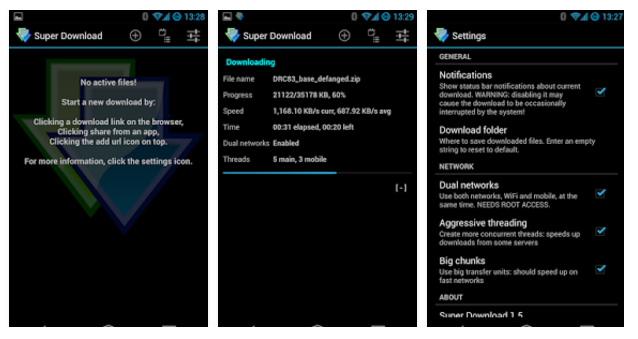
1- Use Wi-Fi and phone data synchronously on your Android device Step 1: First of all, install Super Download. This app is available in Google Play Store in two versions. The first is a paid application.
There is also a Lite version, but it has a maximum usage capacity of 50MB. We suggest trying the Lite version first to see if this guide works for your phone and you can use Wi-Fi and mobile data simultaneously.
Step 1 – Download Super Download Download version
Lite from here Download the full version from here Step 2: Provide the necessary user permissions in order to run the program. Step 3: Go to app settings and make sure there is a check mark on Dual network.
Step 4: Copy a link from your browser for any file you want to download.
Then use Super download to paste the file and download it. 2- Integrating Wi-Fi with data via Speedifyy Another convenient solution is to use the Speedify application, which is available in the Play Store for free in a limited version, then via a monthly subscription for a few euros per month. The Limited Edition allows you to test the app with a maximum of 2GB of data.
If that's not enough for you, a paid subscription will cost €10.99 per month after that. Note that this app also acts as a VPN, and this feature cannot be disabled. If you want to use your network and WiFi at the same time, you will have to connect to the VPN provided by the app.
Then you can turn on Wi-Fi with Data & Wifi via the Speedify VPN Bonding feature. Download the application from here. When you download it, you will install it easily, following the steps that will guide you. Very easy to use. You'll see two of your networks appear, and the most effective one will be selected by default.
Automatically, the app will allow you to choose the most stable and efficient network, without you having to do anything. As a user, you will have a more stable network, without realizing that your phone is using both mobile data and Wi-Fi regularly.
Warning: Do not do this unless you have to
A sufficient mobile data package, otherwise your package capacity will run out quickly after consuming all the data. Related articles: The most important ways to strengthen the Wi-Fi signal at home - 5 tips to get a strong router signal Strengthening the mobile phone signal in areas with weak network 3G/4G/5G
DROPIDEA
We hope this article has added real value to you. At DROPIDEA, we always strive to deliver high-quality content that helps you grow and evolve in the digital space. Follow us for more useful articles and guides.

Admin
DROPIDEA
Latest Articles

Nscale Acquires Anyscale for $1.65 Billion to Expand Its Dominance in AI Infrastructure

How Is AI Accelerating Meta's New App Launches?

Okta Acquires Security Firm Permiso for Around $200 Million

Microsoft Gains $3.2 Billion from Its Investment in Anthropic