How do you choose a laser printer that suits your needs? Here are 11 amazing options in 2024
 By Admin
In your search for a suitable laser printer for the home, office, or large companies, we will help you with our comprehensive guide for beginners and professionals to first learn how to choose the appropriate printer for you. We also show you 11 laser printers with different models that have received the highest ratings and are among the most widespread printer brands in the market, while displaying the features, specifications, and prices so that you can choose what suits you. The speed and capacity of the printer, the resolution and print quality, the purpose of use, the cost of ink and productivity, additional features. Now is the stage of selection and nominations for the best laser printer that provides you with speed, quality and efficiency in printing. We will show you the 11 best laser printers that you can buy in 2024, which were chosen based on user ratings and reviews and nominations from international websites. Let’s get started!
About $429
But another model, the MFP M283cdw, may be available in your country at a lower price, approximately $369.
Why should you choose it?
Why should you choose it? Why should you choose it?
Why should you choose it?
Why should you choose it? Using it: Why should you choose it?
Why should you choose it?
8- HP LaserJet Pro M255dw printer Advantages: It provides excellent print quality in color and black and white. It contains an easy-to-use color touch screen. It supports cloud printing through services such as HP ePrint and Apple AirPrint. It has an elegant and compact design. Cons: It does not support scanning, copying, or fax. The cost of ink is relatively high. Use it: Homes and small offices that need high-quality color printing. Price: about $300.
Why should you choose it?
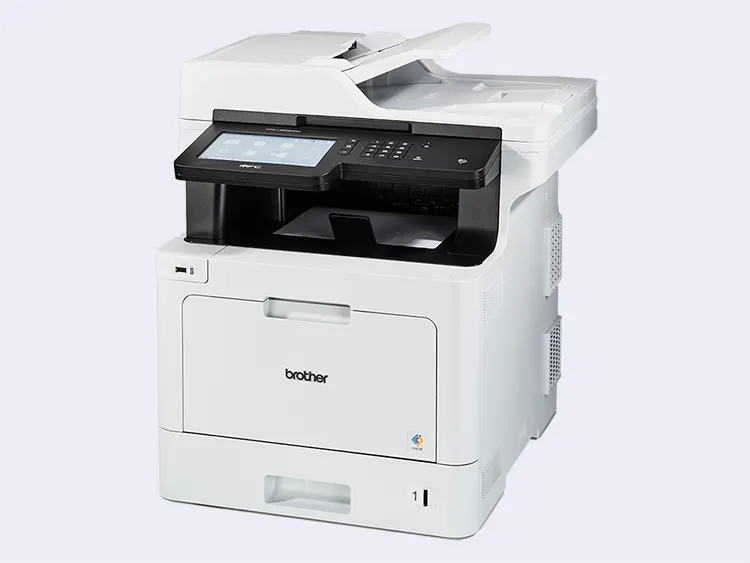
This is the perfect printer for you if you are looking for a color laser printer that delivers great, clear results. The HP LaserJet Pro M255dw offers print speeds of up to 22 pages per minute for both black and color pages, multiple connectivity options including wireless, network, and USB, and a 250-sheet paper tray that can hold different sizes and types of paper such as plain, glossy, or heavy paper. 9- Brother MFC‐L8905CDW printer Advantages: It provides excellent print quality in color and black and white. It contains an easy-to-use color touch screen. It supports cloud printing through services such as Google Drive and Dropbox. It has an elegant and compact design. Cons: It does not support scanning, copying, or fax. The cost of ink is relatively high. Use: Home and small and medium offices that need high-quality color printing.
Price: about $650. Why should you choose it? This is the perfect printer for you if you are looking for a color laser printer that delivers great, clear results.
The Brother MFC-L8905CDW offers print speeds of up to 33 pages per minute for both black and color pages, multiple connectivity options including wireless, network, and USB, and a 250-sheet paper tray that can hold different sizes and types of paper such as plain, glossy, or heavy paper. 10- Canon imageCLASS MF644Cdw printer Advantages: It provides amazing print quality in color and black and white. It contains a color and smart touch screen. It supports cloud printing through services such as HP ePrint and Apple AirPrint. It contains scanning, copying and fax features. Cons: It needs a warm-up time before printing. The cost of ink is relatively high. Its use: Homes and small and medium offices that need color and multi-function printing. Price: about $300.
Why should you choose it? This is the printer for you if you want a color laser printer that provides you with multi-functional features and high quality. The Canon imageCLASS MF644Cdw offers print speeds of up to 22 pages per minute for both black and color pages, a smart color touchscreen that makes it easier for you to control settings and functions, and scanning, copying and fax features that increase your work efficiency.
11- HP Color LaserJet Pro MFP M479fdw Advantages: It provides excellent print quality in color and black and white. It has a color and smart touch screen that supports cloud printing through services such as HP ePrint and Apple AirPrint. It has scanning, copying, and fax features. It has the best security in its category from HP in terms of detecting and stopping attacks. Cons: It needs a warm-up time before printing. The cost of ink is relatively high. Use it: Home and small, medium, and large offices that need color, multi-functional, and secure printing. Price: about $850.
Why should you choose it?
This is the printer for you if you want a color laser printer that provides you with multi-functional features, high quality, and unparalleled security. The HP Color LaserJet Pro MFP M479fdw offers print speeds of up to 28 pages per minute for both black and color pages, an intelligent color touchscreen that makes it easy to control settings and functions, and scanning, copying, and fax features that increase your work efficiency. It also protects you from cyberattacks with HP Dynamic Security technology that detects and stops non-genuine cartridges and modified firmware.
How does a laser printer work? What is the difference between inkjet and laser printers?
How do I connect a laser printer to a computer or network?
How often do I need to replace the toner cartridge in a laser printer? Why does my laser printer produce lines or smudges on printed pages? Suggested related article: Is the printer not printing or responding?
Here are 8 different solutions
DROPIDEA
We hope this article has added real value to you. At DROPIDEA, we always strive to deliver high-quality content that helps you grow and evolve in the digital space. Follow us for more useful articles and guides.
Admin
DROPIDEA
Latest Articles

Microsoft Gains $3.2 Billion from Its Investment in Anthropic

Zuckerberg: Billions of People Will Have AI Assistants Within Five Years

Microsoft Enters Direct Competition Against OpenAI and Anthropic

Pangram Raises $9 Million to Detect AI-Generated Content